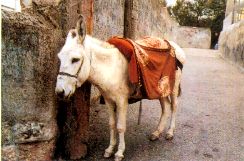
En la biografía del padre Jaime Piulachs, S.J. "Un jesuita rebelde", su autor, mosén José Ricart, recoge retazos de la correspondencia del santo jesuita que no tienen desperdicio. Entre ellos, las siguientes líneas escritas en una postal con la fotografía de... un burro, enviada desde Cavallers en agosto de 1967. Según mosen Ricart, encierran el "secreto" del padre Piulachs, "su especie de testamento".
(..) es de un amigo mío (la foto de la izquierda) muy edificante y al que mucho me gustaría imitar en muchas de sus virtudes. Siempre calla (fuera de algún rebuznillo); nunca se queja, no tiene pretensiones de caballo; carga con todo como lo que es, como un burro. Cuando la gente quiere insultar a otro le dicen su nombre y él no se molesta: le da un comino; se ve que aprendió aquello de "oprobios, injurias, afrentas, etc." Es el más humilde de los animales. Y por humildad, mereció estar con Jesús: en su nacimiento, en su huída a Egipto, llevándolo encima en los momentos duros de la persecución; y después en los gloriosos de la entrada en Jerusalén; y en esos momentos de gloria y de palmas y de andar sobre vestiduras, no se envanecía, porque sabía que esto no era por él sino por el que llevaba encima: él no era sino el borriquito de Jesús. Pidamos al Señor que nos haga también esta gracia a nosotros.
Texto de la Revista Ave María, nº 656 Agosto-Septiembre de 2000
Si te ha gustado la reflexión El burrito, compártela por favor en las redes sociales.
Índice de Web Católico de Javier
 Suscríbase gratis al canal de Whatsapp o Telegram de Web católico de Javier